Drlogy
Healthcare organization
10 Must Have LIMS Features For Pathology Report Format Design
Welcome to the 14th blog focusing on LIMS Features for pathology report format design. Choosing the right Laboratory Information Management System (LIMS) solution is paramount for efficient and accurate pathology report formatting, ensuring streamlined workflows and improved patient care.
Recommended
In this Drlogy Pathology Report Format, we'll explore LIMS features that provide the technological backbone necessary to manage complex pathology data and enhance reporting accuracy within the laboratory ecosystem.
10 Must Have LIMS Features For Pathology Report Format Design
Here are 10 Must Have LIMS Features For Pathology Report Format Design.
| Feature | Description |
|---|---|
| SMART Reports | Utilize artificial intelligence for intelligent report generation |
| Letterhead Format | Customize letterhead for branded and professional reports |
| Header Customization | Customize header elements for personalized report design |
| Footer Customization | Customize footer elements for personalized report design |
| Report Format | Offer customizable report formats tailored to lab preferences |
| Report Sharing | Facilitate easy and secure sharing of pathology reports |
| Report Update | Enable efficient updating of reports with new information |
| Authenticity | Ensure reports are authentic and verifiable |
| Speed & Accuracy | Provide fast and accurate report generation |
| Technology | Implement advanced technology for features and performance |
1. SMART Reports:
- Use LIMS which provides artificial intelligence for intelligent analysis and report generation.
- Automate data interpretation to improve efficiency and accuracy using patients' vitals and medical data.
- Incorporate predictive analytics to anticipate patient needs and outcomes.
- Enhance decision-making with insights derived from AI-based SMART Reports.
- Streamline patient experience processes through AI-driven report generation.
Check
2. Letterhead Format:
- Use LIMS which customize letterhead design to reflect the lab's branding andentity.
- Include essential information such as lab name, logo, and contact details.
- Maintain consistency in letterhead format across all reports for professional presentation.
- Ensure clarity and readability of letterhead elements for easyentification.
- Utilize design elements that adhere to industry standards and regulations.
Check
3. Header Customization:
- Use LIMS which customizes header components to include relevant patient and test information.
- Tailor header layout and design to meet specific reporting requirements.
- Incorporate dynamic fields for automatic population of patient demographics and test details.
- Ensure header elements are clear and well-organized for easy reference.
- Implement header customization options for personalized report formatting.
4. Footer Customization:
- Use LIMS which customize footer elements to include lab-specific information and disclaimers.
- Add regulatory compliance statements and accreditation details as required.
- Include footer components for report pagination and printing information.
- Ensure footer design is consistent with branding guidelines for a professional appearance.
- Provide options for footer customization to accommodate varying reporting needs.
5. Report Format:
- Use LIMS which Offers a variety of report templates to suit different testing scenarios and specialties.
- Provide customizable formatting options for headers, footers, fonts, and layout.
- Incorporate sections for test results, interpretations, and recommendations.
- Ensure report formats are compliant with industry standards and regulatory requirements.
- Allow flexibility for users to create and save customized report templates.
6. Report Sharing:
- Implement secure and user-friendly mechanisms for sharing pathology reports.
- Offer options for electronic delivery via email, patient portals, or mobile apps.
- Ensure patient confidentiality and data privacy during report transmission.
- Provide tracking and confirmation features to verify receipt of shared reports.
- Enable easy sharing with referring physicians and healthcare providers for collaborative care.
7. Report Update:
- Enable seamless updating of reports with new findings or revisions.
- Offer version control features to track changes and updates over time.
- Allow authorized users to add annotations or comments to updated reports.
- Ensure accuracy and consistency between original and updated report versions.
- Facilitate efficient communication of updates to relevant stakeholders.
8. Authenticity:
- Incorporate features to ensure the authenticity and integrity of pathology reports.
- Implement digital signatures or cryptographic techniques to verify report authenticity.
- Provide secure storage and access controls to prevent unauthorized alterations.
- Enable audit trails to track and trace any modifications made to reports.
- Comply with regulatory standards and industry best practices for report authenticity.
9. Speed & Accuracy:
- Prioritize speed and accuracy in report generation and delivery.
- Optimize system performance to minimize report turnaround times.
- Implement quality control measures to ensure the accuracy of test results.
- Utilize advanced algorithms or automation techniques for data processing.
- Continuously monitor and improve system efficiency to enhance speed and accuracy.
10. Technology:
- Leverage cutting-edge technology to enhance LIMS features and capabilities.
- Explore emerging technologies such as machine learning, blockchain, or cloud computing.
- Partner with technology vendors to integrate innovative solutions into the LIMS platform.
- Stay informed about advancements in digital health and diagnostic technologies.
- Invest in ongoing research and development to maintain a competitive edge in technology.
10 Mistakes Avoided For LIMS Features For Pathology Report Format
Here are 10 Mistakes Avoided For LIMS Features For Pathology Report Format.
- Choosing a LIMS that doesn't offer customizable report templates tailored to pathology requirements.
- Overlooking the need for advanced features like AI-driven smart reporting for pathology analysis.
- Neglecting to ensure the LIMS can handle the complexity and volume of pathology data efficiently.
- Opting for a LIMS with inadequate support for integrating various pathology instruments and devices.
- Failing to prioritize data security and compliance features specifically tailored for pathology reports.
- Selecting a LIMS without considering scalability to accommodate the growing needs of pathology labs.
- Overlooking the importance of user-friendly interfaces and intuitive design for pathology report generation.
- Ignoring the necessity for seamless integration with existing pathology workflows and processes.
- Relying solely on cost considerations without evaluating the impact on pathology reporting quality and efficiency.
- Neglecting to involve pathologists and laboratory staff in the LIMS selection process to ensure alignment with their needs and preferences.
Dos vs Don't For LIMS Solution For Pathology Report Format
Here are some Dos vs Don't For LIMS Solution For Pathology Report Format.
| Dos | Don'ts |
|---|---|
| Customize report templates | Neglect customization options |
| Ensure scalability | Overlook scalability needs |
| Prioritize data security | Ignore data security measures |
| Integrate with lab instruments | Neglect instrument integration |
| Involve pathologists in selection | Exclude pathologists from decision |
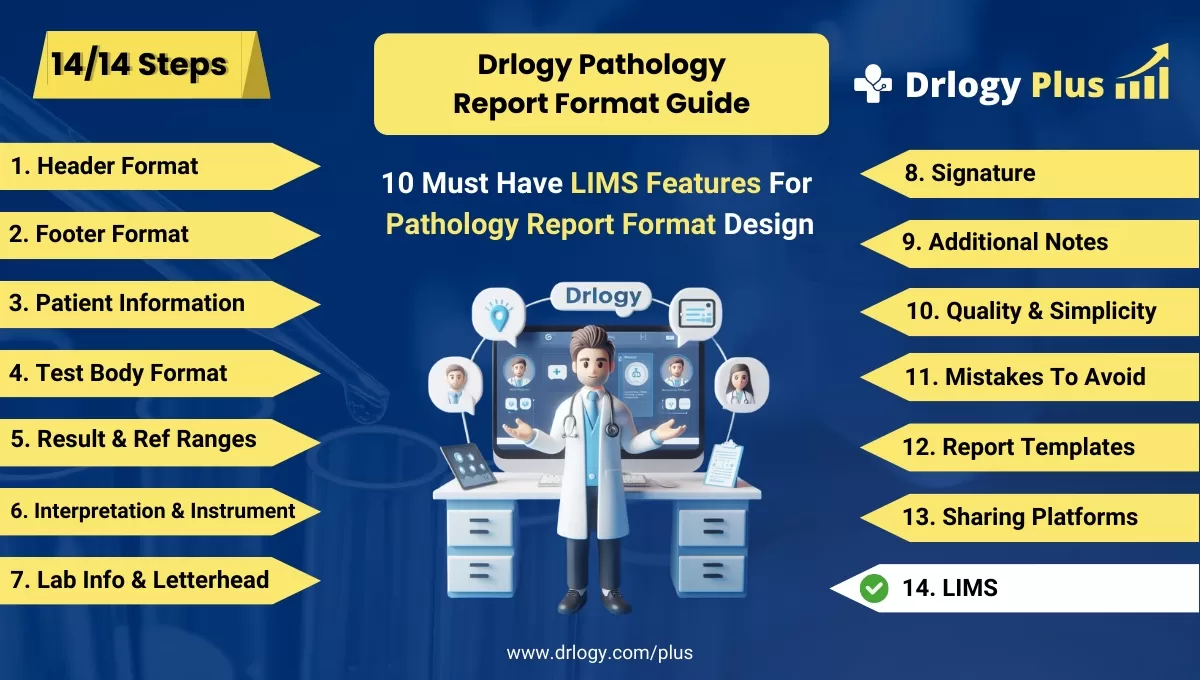
Pathology Report Format Guide
Here are 14 steps guide for designing a pathology lab report format from A to Z.
Summary
Overall, when selecting a LIMS for pathology report format design, prioritize customization, scalability, data security, instrument integration, and involving pathologists for optimal outcomes.
Check Drlogy Pathology Report Format Guide For A to Z information regarding how to make proper report format structure to implementation of report format into you lab work.




